
Digipape Logo

PDF Embed · for authorities, clubs and companies

Take in PDF forms online and work on them as a team

Citizens, members and customers fill in your forms on your website and sign them in the browser. Every submission becomes a case for the team in charge, with all entries, documents and its history.

Request a demo
  • GDPR-compliant, with servers in Germany
  • SSL and AES encryption
  • No account for the people who fill in
  • At your own domain
  • In the cloud or as your own instance
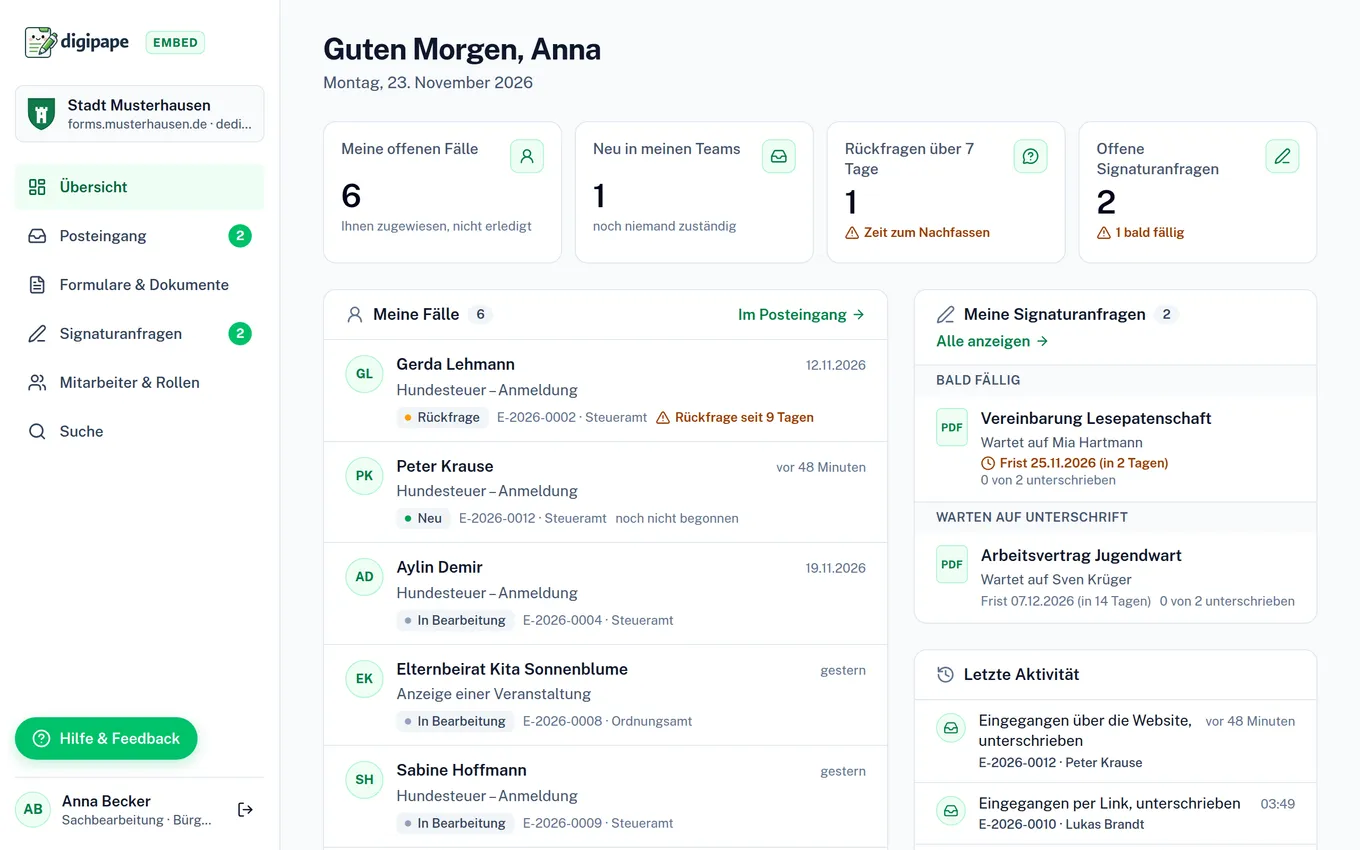
The personal overview in PDF Embed: open cases, new submissions, inquiries and signature requests
The back office is in German for now; the form pages also speak English, Turkish and Ukrainian.

For public authorities, clubs and companies

Wherever forms are filled in, signed and processed.

Public authorities

Take in applications and notifications online around the clock, without printing and scanning. Every submission goes to the office in charge; inquiries and documents sent later stay with the case.

For example

  • Dog tax registration
  • Event notification
  • Nursery place application
  • Resident parking permit

Clubs and associations

Collect membership applications, consents and agreements digitally. The board and the volunteers see only what concerns their team, and you get signatures by email.

For example

  • Membership application
  • Direct debit mandate
  • Consent for a youth trip
  • Use of the sports hall

Companies

Have contracts, orders and onboarding papers filled in and signed online, by several people one after the other if need be. Signed PDFs are kept with the team in charge.

For example

  • Employment contract
  • Order confirmation
  • Confidentiality undertaking
  • Customer master data sheet

Functions

From the PDF template to the finished case, in one place.

Forms from your PDFs

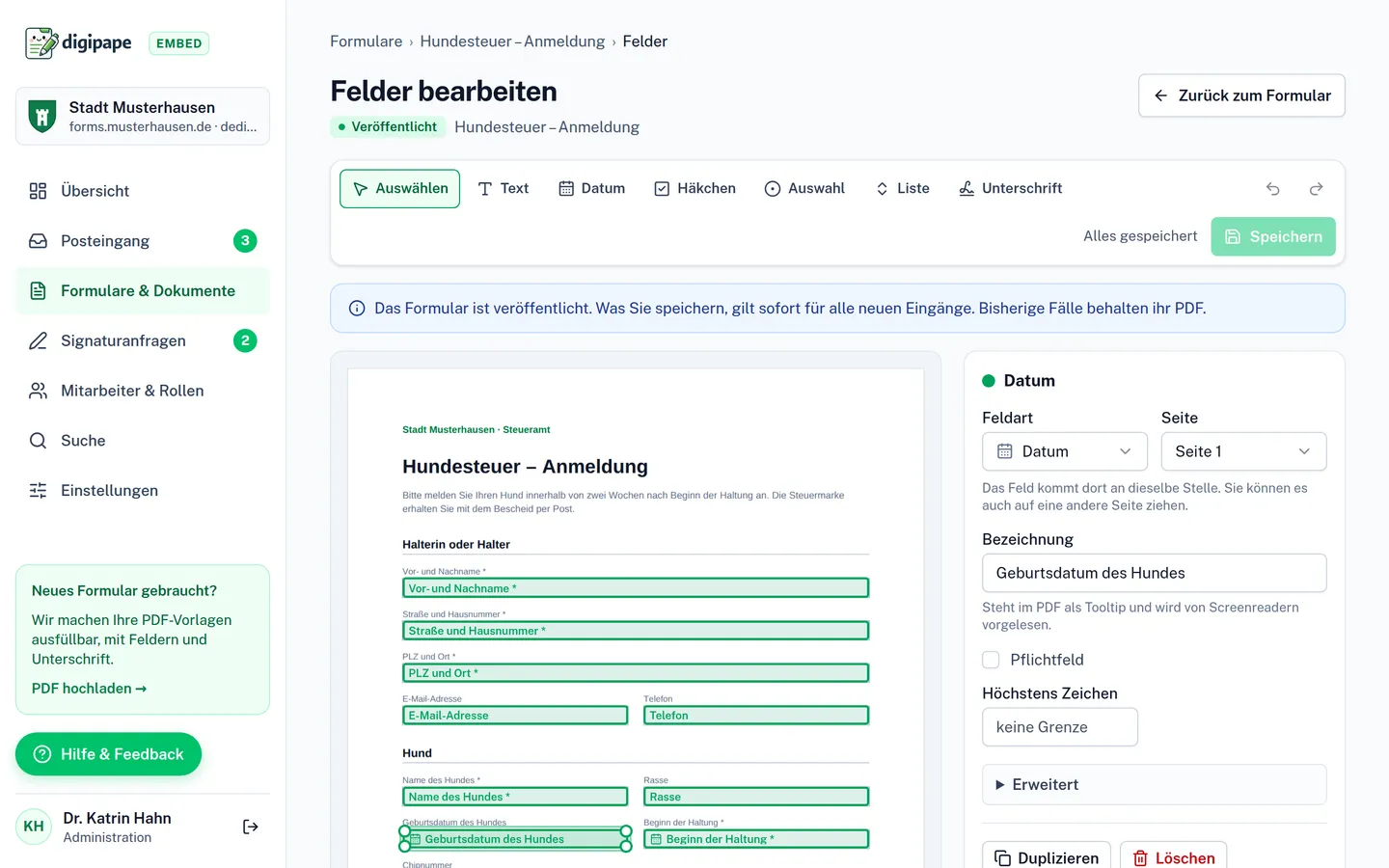
Upload a PDF or a photo of your form. Existing form fields are placed at once; you add the missing ones in the editor with a click.

  • Text, date, tick box, choice, list and signature
  • Required fields, field types, tab order
  • Photos and scans become a PDF, turned the right way up
The field editor with the dog tax registration and the properties of a date field

By link, QR code or on your website

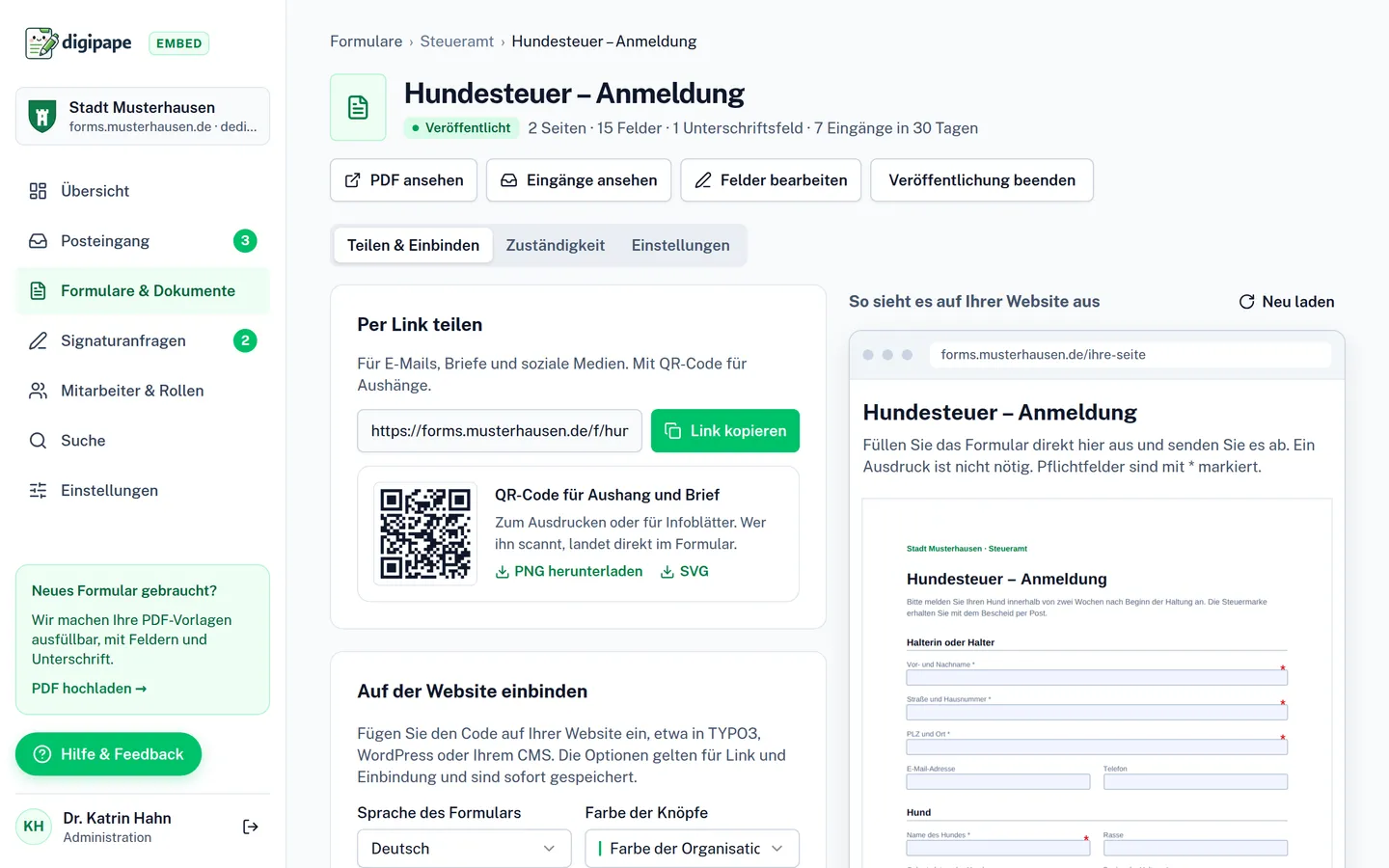
Every form has a link and a QR code for notices and letters. With the embed code it appears in TYPO3, WordPress or your CMS, and the preview shows how it looks there.

  • Language and button colour for each form
  • Allow attachments, such as proofs
  • Make the signature required if you like
Sharing and embedding: link, QR code and the preview on the website

Fill in and sign, without an account

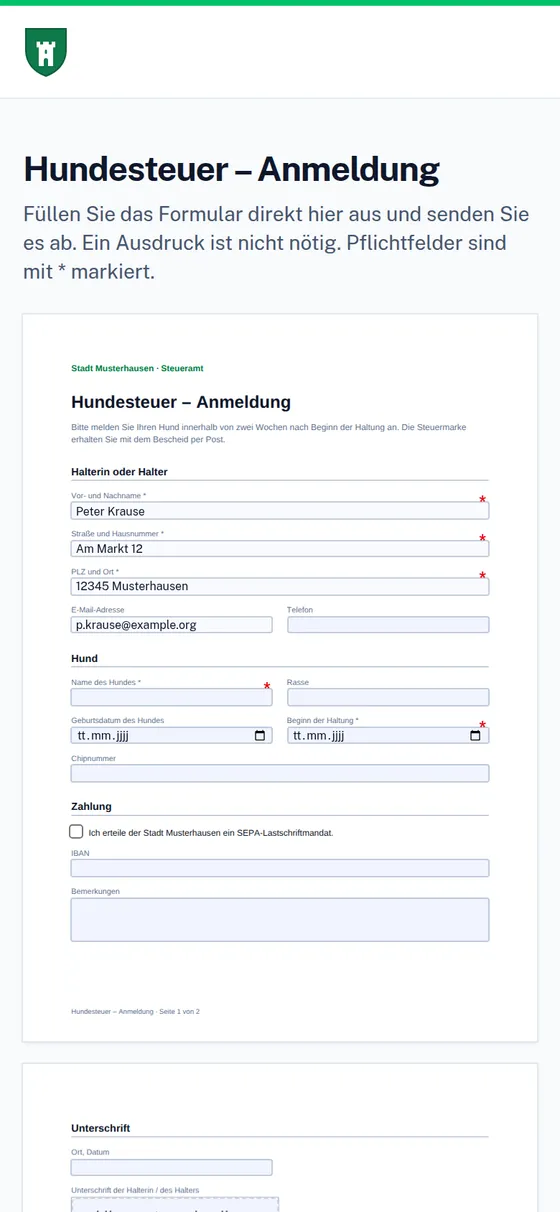
People fill in the form right on the page, on a computer or a phone, and sign with a finger or the mouse. After sending it, they get a case number.

  • Your form looks as it does on paper
  • Form page in German, English, Turkish or Ukrainian
  • The signature goes into the PDF as a sharp vector
The dog tax registration on a phone, partly filled in

Every submission is a case

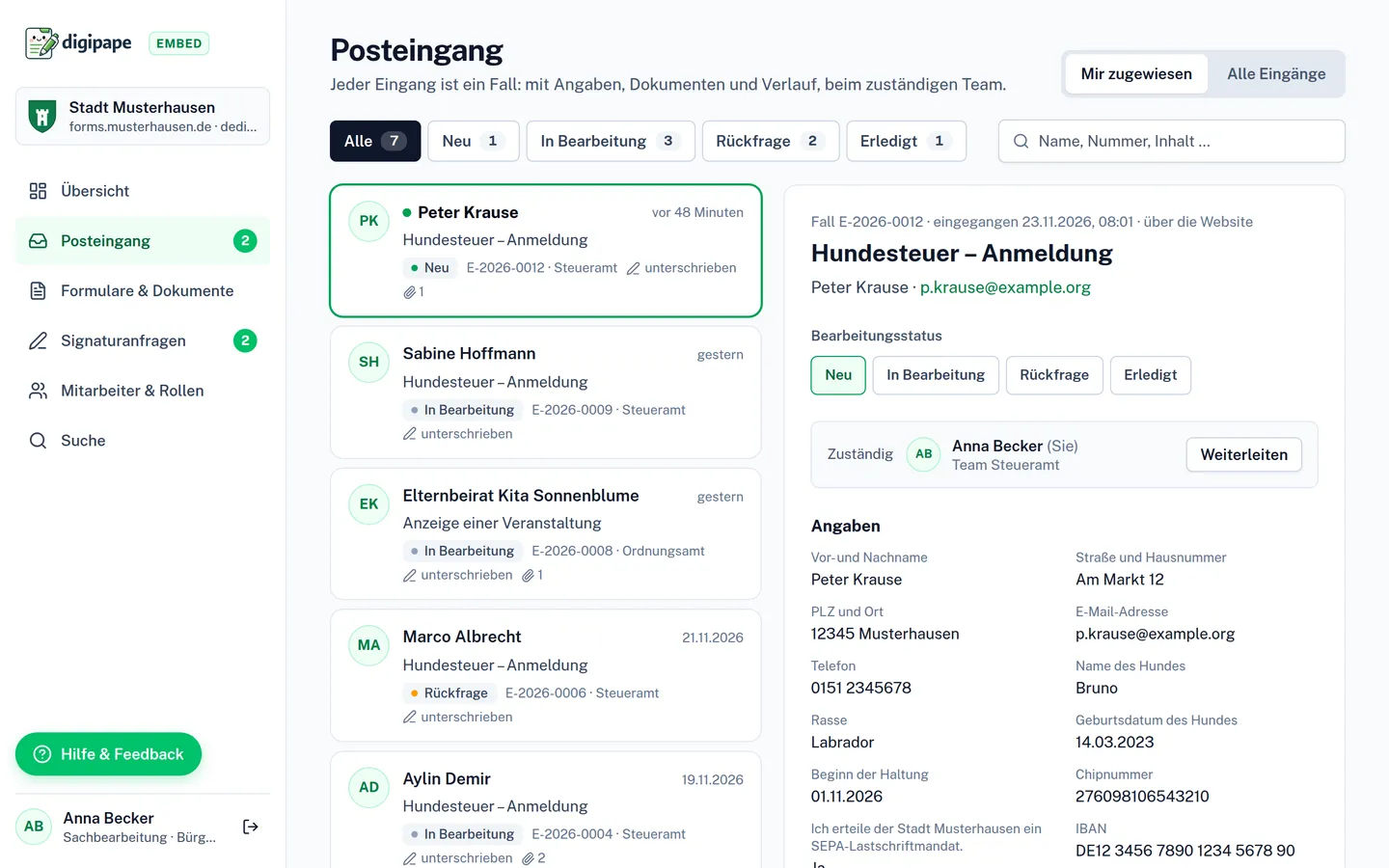
Submissions land in the inbox of the team in charge, by rules you set for each form. Status, assignee, notes and history always show where an application stands.

  • New, in progress, inquiry, done
  • Add documents that came later by post to the case
  • A personal overview of open cases and long inquiries
The inbox with a new case: entries, status and the person in charge

Signature requests by email

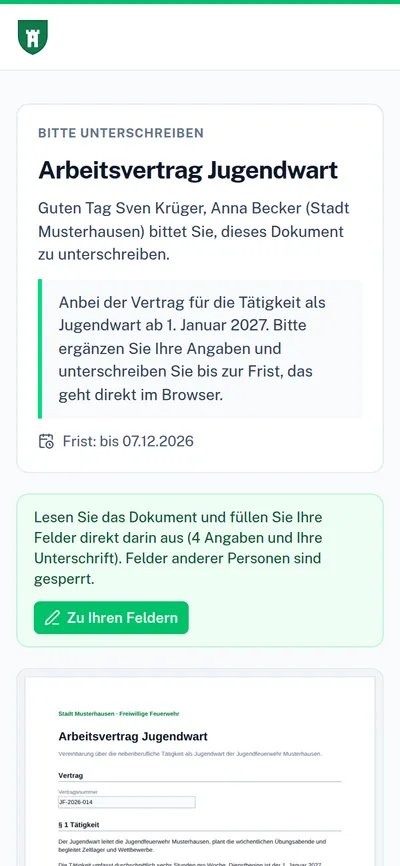
Send contracts and agreements for signature. The recipients sign in the browser, on a phone too, without an account; at the end the signed PDF is ready.

  • Several recipients, in a fixed order if you like
  • Fields for each recipient; staff sign when sending
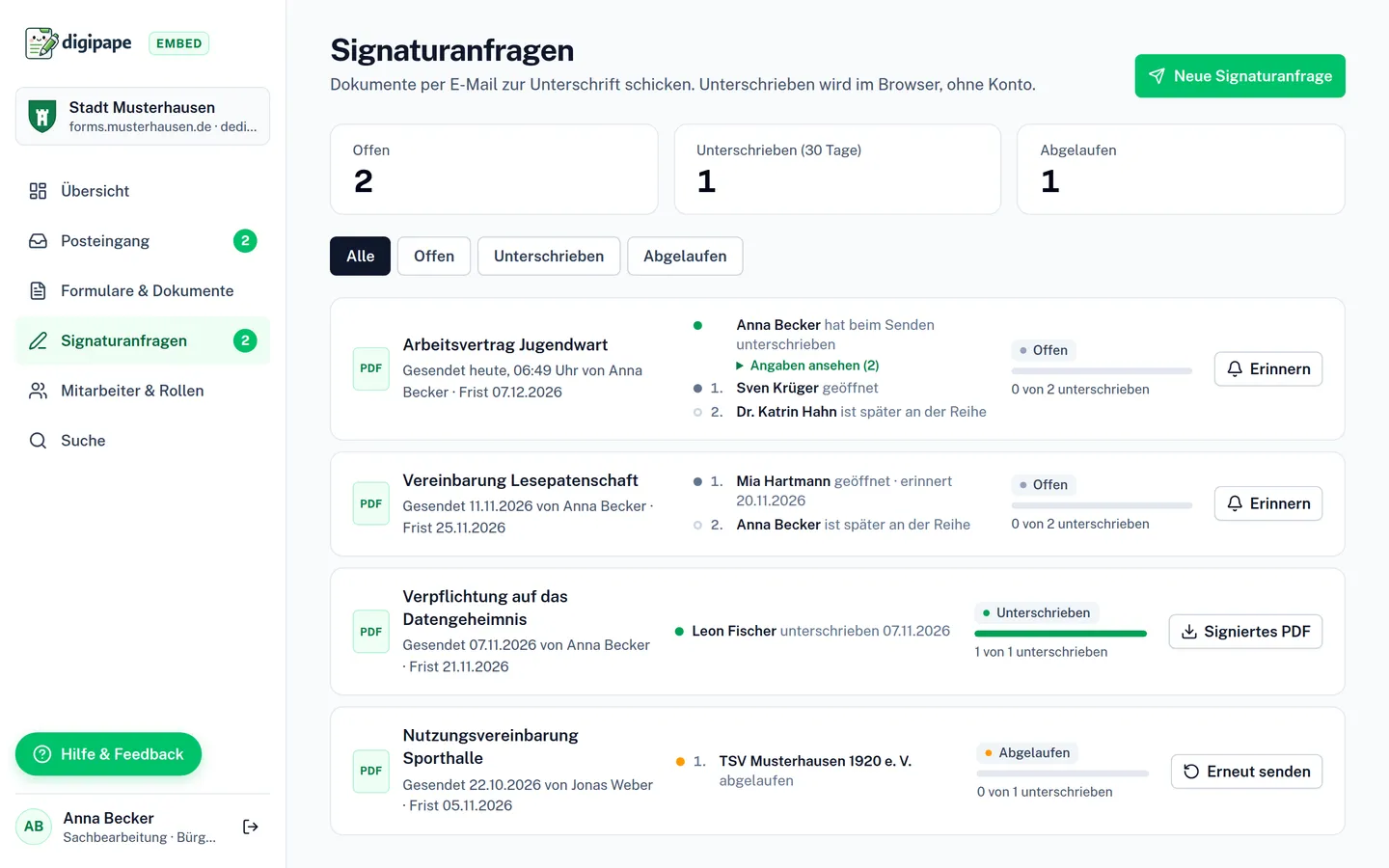
  • Deadline, reminder and an overview of the progress
The signature requests and how far each has got

Teams, roles and permissions

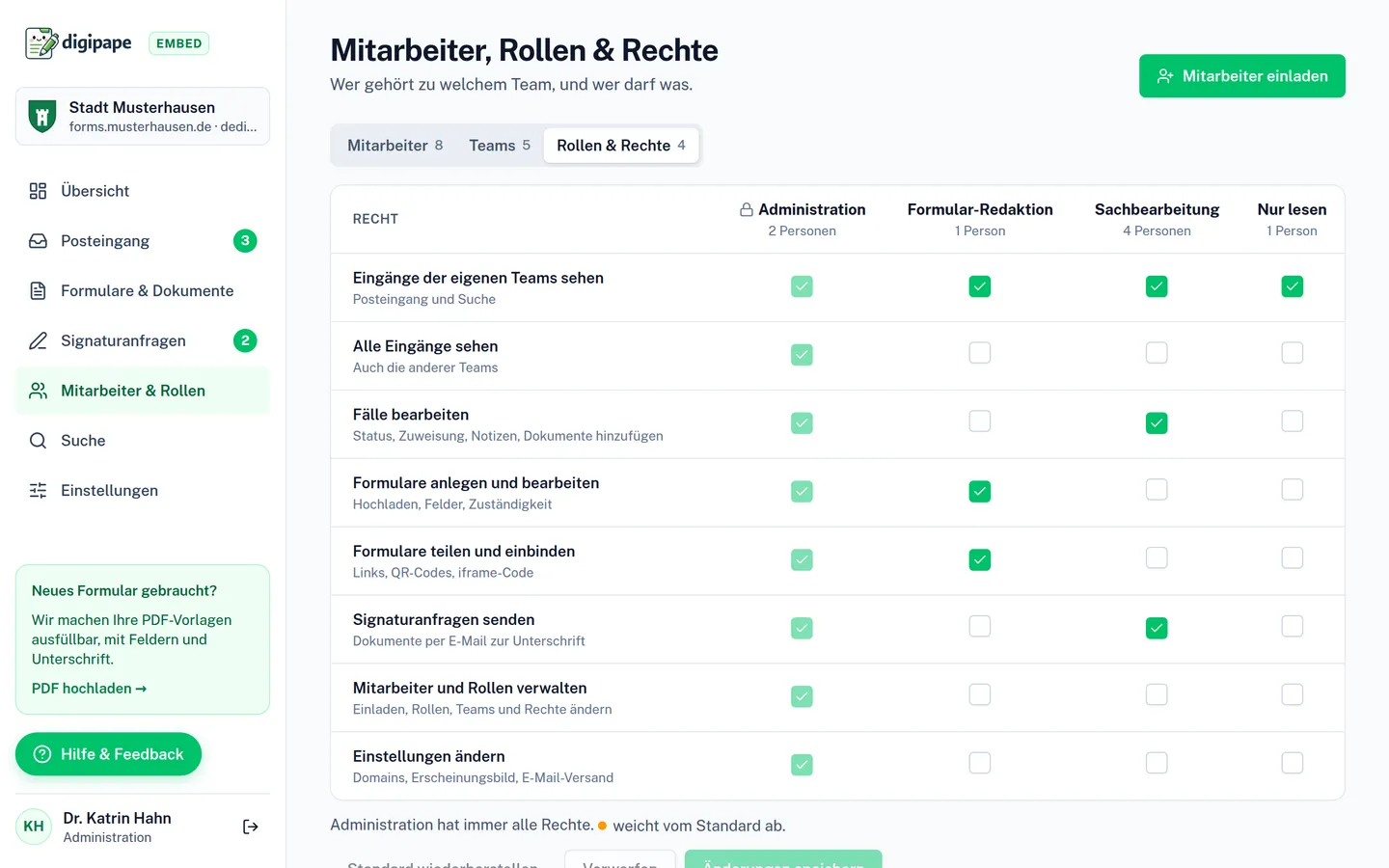
Invite your staff and put them in teams. Four roles set who sees and may do what; you can adjust the permissions of each role.

  • Administration, form editing, case work, read only
  • Two-factor sign-in with an app, an email code or a passkey
  • Two-factor sign-in required for everyone, if you like
Roles and permissions: which role sees submissions, works on cases or shares forms

All features at a glance

What else PDF Embed does for you and your team.

  • Routing rules

    Send a submission to a team or a person, depending on an entry in the form.

  • Inquiries in view

    Cases waiting on an inquiry for more than seven days stand out.

  • Documents for the case

    Proofs, correspondence and decisions, with how they came in and a note.

  • Search everything

    Across cases, forms, documents and staff.

  • QR codes

    For notices, letters and leaflets, as PNG or SVG.

  • Staff signatures

    Whoever sends a request signs their own fields right away.

  • Invitations

    New staff get an invitation and set their password themselves.

  • Your own domain

    The forms run at your address, such as forms.your-town.org, with a certificate.

  • Your look

    Your organisation’s logo and colour on the form pages.

GDPR-compliant and secure

Forms hold personal data. PDF Embed protects it on the way, in storage and within your team.

Data protection under the GDPR

The data is yours; we process it only on your behalf.

  • Servers in Germany: your data and files stay in German data centres
  • A data processing agreement under Art. 28 GDPR
  • Only what your form asks for; no account for the people who fill in
  • Access only for those in charge, through teams, roles and permissions
  • The history shows who changed, forwarded or noted what, and when
  • SSL encryption

    Every connection runs over HTTPS, at your own domain too. We set up the certificate and renew it automatically.

  • AES encryption in storage

    Uploaded PDFs, attachments and signed documents are stored AES-encrypted.

  • Two-factor sign-in

    With an app, an email code or a passkey; required for everyone if you like.

  • Protected files

    No document has a public address; every download is checked.

In the cloud or as your own instance

The functions are the same; you decide where PDF Embed runs. Prices on request, depending on scope and operation.

Cloud

We run PDF Embed for you on servers in Germany. Your data is kept apart from other organisations’ data; we take care of operation and updates.

Your own instance

An instance for your organisation alone, with its own database and file storage, at your domain. We install updates in the maintenance window we agree on.

A connection to your systems or something built just for you: our services for organisations

Your PDF is not a form yet?
We turn your PDF templates into fillable forms, with fields, ticks and signature fields, for 5 € net per form.
Just embed one form, without an inbox?
With the free embed editor you place fields on a PDF and embed it with a link or an iframe. The entries then stay in people’s browsers; nothing is uploaded.

Request a demo

We show you PDF Embed in an online demo, with one of your own forms if you like. Tell us briefly who you are; we will get back to you with a few dates.

  • Your forms and workflows at the centre
  • Questions about operation, data protection and connections
  • No obligation
Optional
Optional

We use your details only to answer your request. Privacy policy

Would you rather talk on the phone?

Name a time that suits you and we will call you.